Best practices for saving files and file formats:
So what should you consider when preparing a file?
There are several things that should be considered when you are planning to save files, first you need to think about who the end user is going to be and what the purpose of the document is for. For example whether it is a read only document, a logo to be printed or files to be shared and edited by a group of people.
Once you have decided what its purpose is and who it is for then here are a few of the things you need to consider;
Resolution- Image resolution is typically described in PPI, which refers to how many pixels are displayed per inch of an image. Higher resolutions means there are more pixels per inch creating a high quality and crisp image as images with lower resolutions have fewer pixels so when enlarged they can become visible. For example: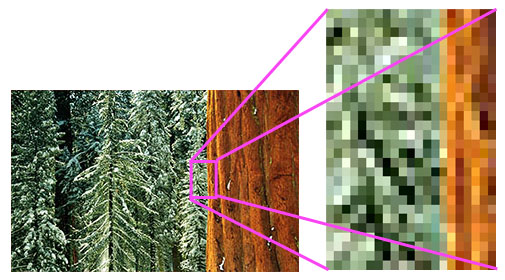
File/Document size - This is the size of the file, if the file is too large it may not be able to be transferred easily or downloaded by the other person so its best to keep the file size to a minimum without loosing any quality or information.
Colour mode: If choosing to print a file CMYK should be chosen for printing and RGB for screen and web use.
Naming your files - When you have chosen the format in which you are saving its always good to make sure you name your file to send or share with a clear name. Not using any special characters such as !@%, add the date displayed as year, month, date (2022,02,10), add a version number if required (_V1) or if a project name add a CamelCase name (Project_Author_Date). By making the name of your file clear and precise it helps the user to find and use the file after downloading as it will appear in chronological order by date.

What programme it is made in? So consider whether the end user will have the programme you made the file in. If it is saved as a JPEG for example usually this can be viewed by anyone as most computers can read these files but if the file was made in PHOTOSHOP or ILLUSTRATOR for example, when saving you can change the format of the file to formats such as JPEG, PNG, PDF, GIF or SVG.
So lets look at some examples of file formats and their uses and options for where to save these files-
File Formats- JPEG (Joint Photographic Experts Group) is 'lossy' compression commonly used for photos that supports full colour range used for printing photos or artwork. PNG (Portable Graphics Format) is for lossless compression which reduces the number of colours and is generally used for graphics such as icons or logos. PDF (Portable Document Format) documents are generally read only and contain embedded images and text to save files that can't be modified but can still be easily shared and printed. GIF (Graphics Interchange Format) is used for a series of images and simple animations on the web and SVG (Scalable Vector Graphics) is used for high quality files which uses Vectors instead of pixels so the quality of an image is not lost when scaled to a larger size and displaying two dimensional graphics, charts and illustrations on websites.
Saving Options - It is important to decide where you are going to store your files whether it is for personal use or is needed to be shared with other people. Some online clouds storage give you the option to be able to view it anywhere anytime online and allow access to chosen group of people. This also protects the data and passwords and also can become a backup for your files if your computer has issues or breaks. For example Dropbox, Google Drive and ICloud. Another way to save your files is on your Computer, on USB or on a Hard Drive. These options can keep any personal data private and are a good way to store personal information not intended for public viewing. These options can also be portable and used when using multiple computers remotely.
So there's your round up of options fo choosing file formats and saving options. Hope this helps!


